
Page: Webhooks
Who this is for: people who connect other systems, such as GitHub, Stripe or your own app, so they can start workflows.
Before you start: everyone can see this page. To add, pause or change a webhook you need the Manage webhooks permission (Admin and Editor). Rotating and deleting need a person with Manage webhooks. Nobody can show a signing secret after it was first shown.
A webhook is an address that another system sends events to. Each event starts the workflows that listen to that webhook (in the workflow file, on: webhook: endpoint: <name>).
The list
Section titled “The list”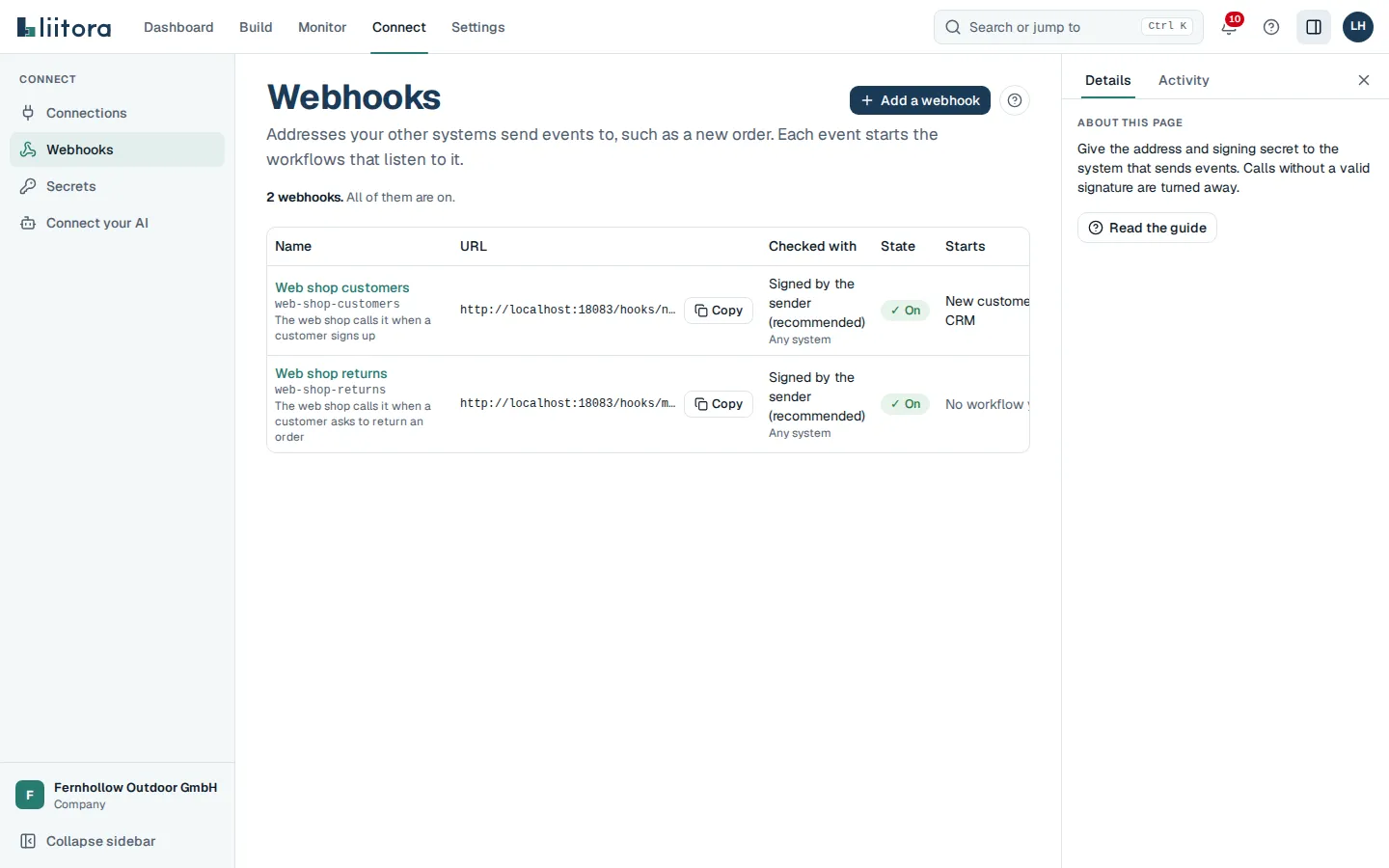
The page starts with one sentence that says what webhooks are for, and a line that says how many webhooks there are and how many need attention. Below it, a table of webhooks:
| Column | What it shows |
|---|---|
| Name | The name in words (for example Devices changed), with the name workflows listen on (devices-changed) in small grey text and the description. Select the name to open the webhook. |
| URL | The address to give the sender, with Copy the URL. |
| Checked with | How requests are checked, and the sender (Any system, GitHub or Stripe). |
| State | On, Paused, Waiting for its signing secret, Signing secret expired or Blocked. |
| Starts | The workflows it starts, by name, or No workflow yet. |
| Last event | When the last event came, or None yet. |
The ones that need someone come first: blocked by Liitora, waiting for its signing secret, signing secret expired or paused. With seven or more webhooks, a Search box finds one by its name, description or the workflows it starts.
Add a webhook opens a form: Name, Description, Sender (Any system, GitHub or Stripe) and How requests are checked (Signed by the sender (recommended), A token in each request or A username and password in each request; the hint under it names the technical method). Select Create the webhook. You get the URL and signing steps. The signing secret is not shown there.
When there are none, the page says Let another system start your workflows, and its button opens the form.
One webhook
Section titled “One webhook”The webhook’s page has its name in words as the title, with the name workflows listen on under it, and its state. A link to a webhook that was deleted, or that belongs to another company, says We couldn’t find that webhook.
- When Liitora has blocked the webhook, a note says Liitora has blocked this webhook, since when and why.
- When the signing secret is missing or expired, a note says that events are refused until it is added. People who manage secrets get Add the value, which opens the secret in a panel on the same page so you can paste it; everyone else is told to ask someone who manages secrets.
- Address and signing: the URL with Copy the URL, the signing steps for the sender (the Signature header, Timestamp header, What is signed and Accepted clock difference), and Workflows it starts by name. A webhook that starts no workflow yet says No workflow uses this webhook yet. Events that arrive are kept, but they start nothing. and what to do: build a workflow that starts when an event arrives (Build a workflow opens the guided New workflow if you can edit workflows), or ask your AI assistant to build one.
- Recent events: the latest events with when they arrived, their size, their headers and the Runs they started. Signatures, credentials and sender addresses are never stored. With none yet, it says No events yet. When the sender sends one, it shows up here.
- Signing secret: never shown on this page. It is shown once, when the webhook is made. Rotate secret makes a new secret, shows it to you once with Copy this secret now. It won’t be shown again, not even to an admin., and keeps the previous one working for a grace period of 0 to 168 hours, so you have time to update the sender. Select I’ve copied it when done. For Stripe you paste Stripe’s own secret instead.
- Send a test event: Show the script shows a ready-made script that signs a sample event and sends it. It reads the secret from an environment variable, so the secret is never in the script. If the script can’t load, select Try again.
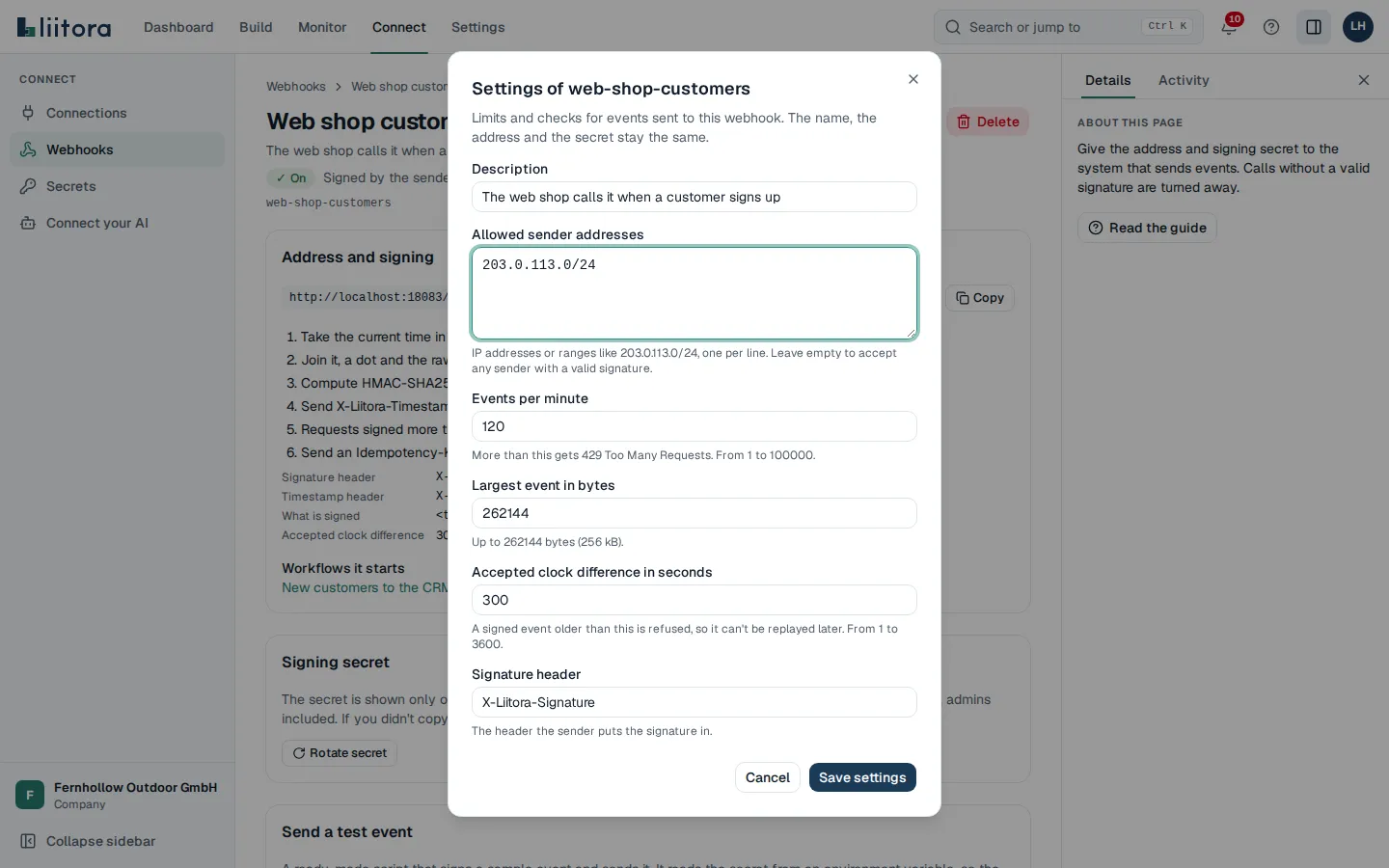
- Pause and Turn on stop and start accepting events. Edit settings changes the Description, Allowed sender addresses (IP addresses or ranges; empty accepts any sender with a valid signature), Events per minute (more gets 429), Largest event in bytes, Accepted clock difference in seconds (signed webhooks) and the Signature header (generic signed webhooks). The name, the URL and the secret don’t change. Delete removes the webhook, its events and its secret. The URL stops working at once.